










Support doc


Monitoring and acting on exceptions
Monitor delivery exceptions across connected accounts and investigate affected orders quickly.

For the complete documentation index, see llms.txt.
Monitor orders and manage fulfilment operations across warehouses, stores, brands and 3PLs from one place.
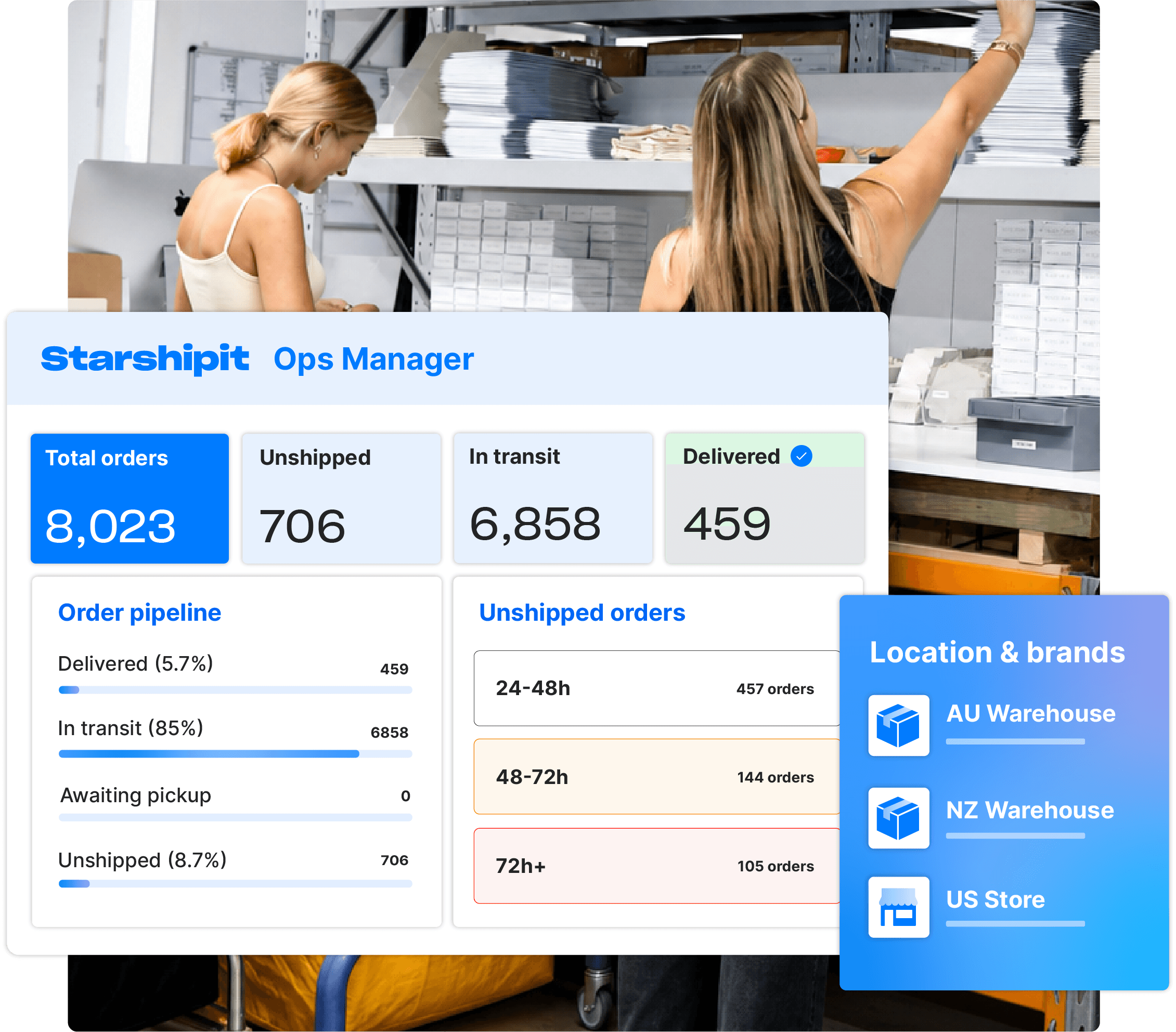
Starshipit's Ops Manager helps you monitor orders, catch delays and exceptions, manage fulfilment settings and keep orders moving across your connected Starshipit accounts.
Trusted by 30,000+ retailers globally.
As you add warehouses, stores and 3PLs, fulfilment becomes harder to coordinate. Orders, settings and workflows are spread across multiple locations, making it difficult to maintain visibility and consistency.
Ops Manager gives you a single operational view across your fulfilment network, helping you spot issues early, standardise operations and keep orders moving.
Give your team the tools to oversee performance, monitor orders and manage fulfilment settings across connected Starshipit accounts.
See operational health at a glance
View performance across your locations and brands, so your team can quickly see what’s running smoothly and what needs attention.
Monitor orders and exceptions
Catch fulfilment issues, delays and exceptions early, before they become customer problems.
Manage settings centrally
Manage carriers, locations, brands, users, tags and shipping rules from one place.
Support ship-from-store
Route eligible orders to store locations, helping your team make better use of retail stock across your fulfilment network.
Reduce account switching
Manage connected child accounts from one central place, without jumping between separate Starshipit accounts.
Generate invoices across child accounts
Create invoices across all child accounts without switching between them.
When fulfilment runs across stores, warehouses and 3PLs, your team needs clear visibility of where orders can be fulfilled, where stock is available and which locations need attention.
Starshipit's Ops Manager helps you coordinate order flow across your network, with advanced routing, inventory and replenishment capabilities available through Starshipit WMS and Shopify.
Route orders to the best location
Route orders to the warehouse, 3PL or store best placed to fulfil them, helping you support ship-from-store as part of your wider fulfilment network.
View inventory across locations
With Starshipit WMS enabled, see stock availability across your fulfilment network.
Respond faster to issues
Spot delays, exceptions and location-level issues earlier, so your team can act before fulfilment slows down.
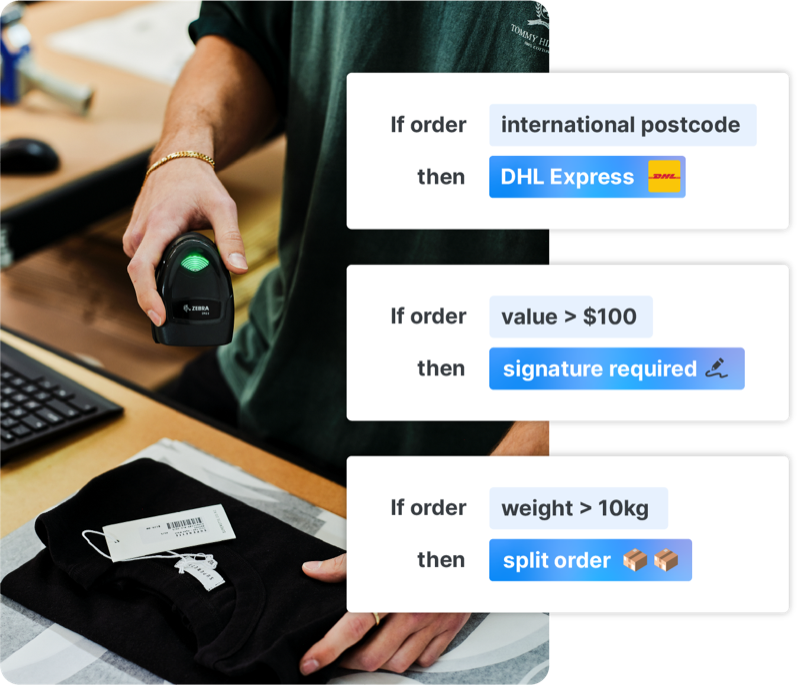
As your fulfilment network grows, small updates can become repetitive admin.
Starshipit's Ops Manager lets your team manage key settings in bulk across connected Starshipit accounts, keeping shipping rules, users and tags consistent across locations, brands and 3PLs.
Update shipping rules in bulk
Apply changes across connected accounts without rebuilding the same rules in each account.
Manage users centrally
Add, update or manage users across accounts from one place.
Keep tags consistent
Manage tags across connected accounts, so teams can classify and track orders in a consistent way.
Starshipit is an award winning technology platform





Recognised by the NZ Hi-Tech Awards, Retail Systems Awards, TIN Awards, NORA Awards, VIP Awards, G2 and more.
Managing multiple Starshipit accounts can make billing harder to keep on top of.
Starshipit's Ops Manager lets you generate invoices for all child accounts from one place, giving finance and operations teams a simpler way to manage billing across connected accounts.


See what’s happening across the network
Get a dashboard overview of performance and operational health across locations and brands.

Catch issues before they escalate
Monitor orders, delays and fulfilment exceptions before they become customer problems.

Manage operations centrally
Manage carriers, locations, brands, users, tags and shipping rules from one place.

Add smarter routing and inventory visibility
With Starshipit WMS, route pooled orders and view stock levels across locations. With Shopify integration, create replenishment orders from sales data.
Monitor delivery exceptions across connected accounts and investigate affected orders quickly.
Review usage and create invoices across Child Accounts from one place.
Standardise routing and shipping rules across connected operations.
How a retailer used stores, carriers and fulfilment tools together.
Ops Manager is a Starshipit tool for managing fulfilment across connected Starshipit accounts. It gives teams a dashboard overview of operational health, order monitoring, centralised management, billing, and advanced routing and inventory capabilities when the right add-ons are enabled.
You’ll need at least two child accounts connected to your Starshipit account to use Ops Manager. Once connected, Ops Manager brings these accounts into one central place, so your team can manage them more easily.
You can manage carriers, locations, brands, users, tags and shipping rules from one place.
Yes. Ops Manager lets teams manage shipping rules in bulk across connected Starshipit accounts, helping keep fulfilment settings consistent.
Yes. With Starshipit's WMS, Ops Manager can assign pooled orders to specific stores or fulfilment locations, and return them to the pool when needed.
Yes. Inventory visibility is available with Starshipit's WMS, so teams can view stock levels across locations.
Ops Manager gives your team a central view of orders and fulfilment activity across connected Starshipit accounts. When Starshipit WMS is enabled, you can also access inventory and replenishment capabilities, helping teams make smarter fulfilment decisions across warehouses, stores and 3PLs.
Yes. With Shopify integration, Ops Manager can create replenishment orders based on Shopify sales data.
Yes. Ops Manager lets you generate invoices across child accounts from one place, reducing the need to check billing separately in each account.
Ops Manager is billed at $10 AUD per child account, per month, in addition to the standard child account add-on fee. Your total cost depends on how many child accounts are connected under your Starshipit account.
Set up linked child accounts for locations or 3PL clients that need separate shipping settings. Ops Manager brings those accounts together, so your team can monitor orders, delays and exceptions, and manage carriers, users and shipping rules from one place. It supports ship-from-store routing; with Starshipit WMS enabled, you can assign pooled orders to specific fulfilment locations and view inventory across sites. You need at least two connected child accounts to use Ops Manager.
Ship-from-store is a fulfilment approach where retail stores are used to pick, pack and dispatch online orders. Instead of every order being fulfilled from a central warehouse, eligible orders can be routed to a store location, helping retailers make better use of stock, reduce delivery times and improve inventory turnover.
Yes. Starshipit’s Ops Manager helps teams identify which orders can be fulfilled from stores, making it easier to use retail locations as part of a wider fulfilment network.
With Starshipit, eligible orders can be routed to the store, warehouse or 3PL best placed to fulfil them. Teams can connect order routing, inventory visibility and shipping workflows to reduce warehouse pressure and make better use of available stock across locations. Learn more about how to set up ship from store with Starshipit, including order routing, child accounts, and delivery options.