For the complete documentation index, see llms.txt.
Warehouse team using an eCommerce warehouse management system

How to choose a warehouse management system for eCommerce

Published: 2026-08-10

Written by Tara Hunt

Summary: Choose a WMS by testing the real work your warehouse needs to do: receive stock, put it away, replenish pick faces, pick, pack and hand orders to shipping. The best fit gives your team reliable stock visibility and repeatable workflows now, while supporting the next realistic stage of growth without unnecessary complexity.

Key points:

  • Use real warehouse scenarios in every supplier demonstration, including exceptions.
  • Score every option on connected inventory, warehouse and shipping workflows - not features in isolation.
  • Compare total cost and the first operational outcome, not subscription price alone.

A warehouse rarely breaks all at once. It gets harder to run one workaround at a time: a stock adjustment checked in a spreadsheet, a picker walking back for a missed item, a packed order waiting for someone to re-enter shipping details.

That is why choosing a warehouse management system should start with the work your team does every day, not a feature checklist. A growing eCommerce warehouse might need clearer stock locations, more reliable receiving, faster picking or a better handoff to shipping. The right system solves those constraints without forcing unnecessary complexity onto the team.

If your main need is a clearer outbound process, Pick & Pack can help teams pick, pack, verify orders and print shipping labels. A WMS adds broader control over inventory and warehouse work, including receiving, putaway, stock movements, replenishment and location-based picking. Compare Pick & Pack and WMS workflows to work out which level of control fits your operation. If you are ready to compare WMS options, this buyer's guide will help you define the must-haves, test integration fit and ask better questions before you commit.

Luna Rae warehouse team member preparing customer orders

What should an eCommerce WMS include?

An eCommerce warehouse management system should give your team accurate stock visibility and guide the physical work from receiving through to dispatch. The exact depth you need will depend on your products, warehouse layout, order profile and growth plans.

Start with the workflow, not the feature name.

  • Inventory visibility

    Your team should be able to see what stock is available, allocated, being moved or waiting to be received. Ask how often inventory updates and how the system handles discrepancies.

  • Warehouse locations

    Look for a structure that reflects how your warehouse works, such as zones, aisles, shelves, bins and pick faces. Clear locations make stock easier to find and help new staff follow the same process.

  • Receiving and putaway

    The WMS should help teams check incoming stock, record shortages or damage and move products into the right storage locations.

  • Picking and packing

    Compare how each system creates pick work, guides staff to the right location, validates items and quantities, and handles packing exceptions.

  • Replenishment and stock movements

    A useful WMS should help keep pick locations stocked and record stock as it moves between locations, rather than relying on memory or separate spreadsheets.

  • Reporting and traceability

    Check whether you can investigate stock adjustments, task history, errors and team workload. Reports should help you identify the cause of a problem, not only show totals.

  • Support for your operating model

    If you manage multiple warehouses, sales channels, brands, bundles or 3PL clients, test those real scenarios in the product demonstration.

Why are retailers investing in WMS now?

The pressure is not simply to add another tool. It is to make stock, warehouse and shipping decisions work together as order volume and delivery expectations rise. In Evolving Expectations 2026, warehouse management systems were retailers’ top planned investment at 36.2%. The same research found 69.6% already use shipping automation, while 27.5% use a WMS - a useful reminder to test how connected your fulfilment tools really are.

36.2%

In Evolving Expectations 2026, warehouse management systems were retailers’ top planned investment at 36.2%.

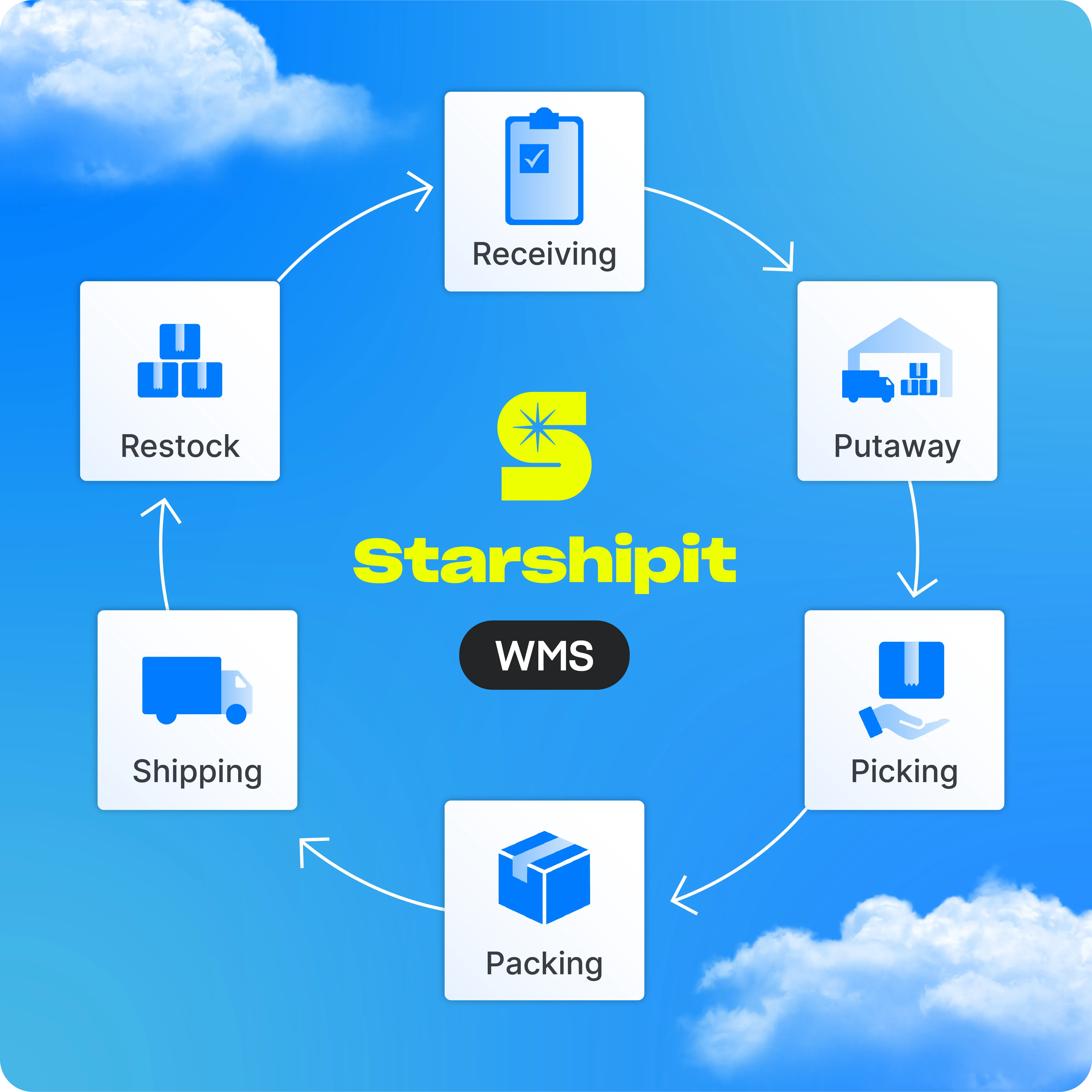
Illustration of connected warehouse workflows, from receiving and putaway to picking, packing, restocking and shipping

How should a WMS connect to shipping software?

The handoff between packing and shipping should be part of the selection process, not an integration detail left until implementation. When an order is packed, the shipping workflow needs the right address, package, service and order information without the team re-entering data.

Ask each supplier to show the full journey from an order arriving to a label being printed and tracking being written back to the sales channel. Include cancellations, split shipments, partial fulfilment and failed label creation in the demonstration.

A separate WMS and shipping platform can work well when the connection is reliable and ownership is clear. A connected warehouse and shipping suite has a practical advantage: fewer systems, fewer handoffs and less duplicate data for your team to manage. Compare the complete workflow, the data exchanged and what happens when a label, order or integration needs attention.

To understand the roles more clearly, compare warehouse management systems and shipping software. You should also check whether shortlisted systems connect with your current eCommerce, accounting, inventory and carrier setup through supported integrations or an appropriate API.

What questions should you ask before choosing a WMS?

Bring real warehouse examples into every sales conversation. A polished standard demonstration will not tell you how the system handles your busiest day, an unexpected stock discrepancy or a process that crosses teams.

  1. Which problems will the first phase solve, and which will remain outside scope?
  2. How does the system represent our warehouses, locations, products, bundles and stock states?
  3. What happens from purchase order receiving through to putaway?
  4. Which picking methods are supported, and how are exceptions handled?
  5. How does packing connect to carrier selection, label printing and tracking updates?
  6. Which integrations are maintained by the WMS provider, and who supports an issue across systems?
  7. What data must be prepared before implementation, and who is responsible for it?
  8. How will warehouse staff be trained, supported and given access to test workflows?
  9. Which reports will help us monitor stock accuracy, throughput, errors and workload?
  10. What are the ongoing costs for users, locations, devices, integrations, support and future changes?

How do you compare WMS cost, complexity and time to value?

The cheapest subscription is not always the lowest-cost option. Compare the total work required to get useful results, including data preparation, integrations, devices, process design, training, support and internal time.

Time to value is the point when the new process is working reliably and the team can see an operational improvement. Define that outcome before signing. It might be more accurate receiving, clearer stock locations, fewer picking errors or a faster packing-to-shipping handoff.

  • Implementation effort: What must be configured, cleaned, mapped and tested before go-live?
  • Team usability: How many steps does each common task take, and what happens when the usual process changes?
  • Technical complexity: How many systems, connections and support teams sit between an order and dispatch?
  • Ongoing cost: Include subscriptions, implementation, integrations, hardware, support, maintenance and the internal cost of manual work that remains.
  • Operational fit: Can the system support today's workflows and the next likely change without a large redesign?

What should growing retailers avoid?

A WMS should add structure where growth has created uncertainty. It should not add complexity for its own sake. Watch for these common selection mistakes.

  • Buying for a distant future: A long list of enterprise features has little value if your team cannot use the core workflows well. Prioritise the next stage of operational complexity you can describe with confidence.
  • Treating every feature as equally important: Separate must-haves from useful extras and test the most frequent, costly or error-prone workflows first.
  • Leaving shipping until the end: The warehouse process is not complete when an order is packed. Test carrier selection, labels, manifests and tracking as part of the same journey.
  • Underestimating data and change management: Even a simple system needs clean product data, clear locations, agreed processes and time for the team to learn.
  • Choosing on price alone: A low software cost can be offset by custom integrations, manual work, slow support or a process the team struggles to follow.

A practical eCommerce WMS comparison checklist

Use the same scorecard for every shortlisted WMS. Give more weight to the criteria tied to your biggest operational problems, then record evidence from the demonstration rather than relying on a yes or no answer.

Workflow fit

  • Inventory accuracy and visibility across the locations you manage

  • Receiving, putaway, movements and replenishment workflows

  • Picking, packing, barcode scanning and exception handling

  • Shipping handoff, carrier workflows and tracking updates

  • Integration fit with your current and planned systems

Operational fit

  • Usability for warehouse staff, supervisors and operations teams

  • Implementation plan, training, support and ownership

  • Reporting that supports practical warehouse decisions

  • Total cost, including integrations, devices and internal effort

  • Fit for the next realistic stage of your fulfilment model

Choose an eCommerce warehouse management system around the work

The best way to choose an eCommerce warehouse management system is to make the buying process operational. Map the problems, show suppliers the real workflows, test the shipping handoff and score each option against the same evidence. If a provider cannot demonstrate how its system handles your routine work and your exceptions, it is not ready for your shortlist.

Starshipit WMS keeps inventory, warehouse jobs and multi-carrier shipping connected in one platform. Your team can manage location-based stock control and scan-led receiving, putaway, movements, replenishment, picking and packing - then move straight into shipping without stitching separate systems together. Explore Starshipit Warehouse Management to see whether that connected approach fits your operation.

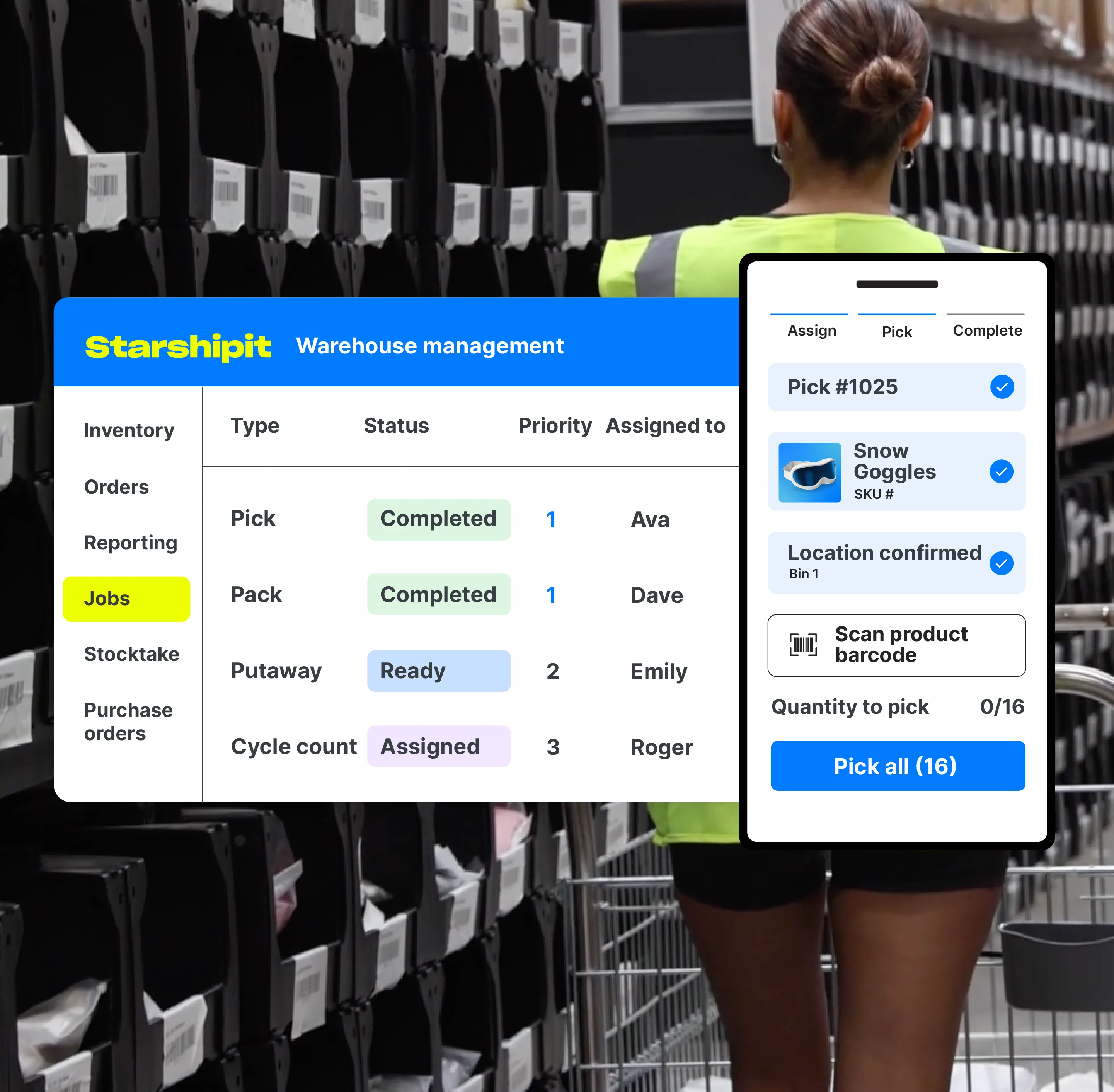
Starshipit warehouse management interface used for inventory and picking workflows

You do not have to map the change alone. Our shipping experts can help you talk through your warehouse workflow, identify where connected WMS and shipping can remove friction, and guide your team from setup through to the day-to-day operation. Book a WMS demo or start a 30-day free trial to see how it could work for your team.

Frequently asked questions

What is an eCommerce warehouse management system?

An eCommerce warehouse management system, or WMS, helps teams control inventory, locations and warehouse work such as receiving, putaway, replenishment, picking and packing. It should connect warehouse activity with the order and shipping systems used to fulfil online sales.

Which WMS features should a growing retailer prioritise?

Prioritise the features linked to your current bottlenecks. Common must-haves include real-time inventory visibility, location control, receiving and putaway, stock movements, replenishment, barcode-led picking and packing, reporting, integrations and a reliable handoff to shipping.

How long does WMS implementation take?

Implementation time depends on warehouse complexity, data quality, integrations, process changes, testing and training. Ask suppliers for a plan based on your actual workflows, with clear responsibilities and a defined first operational outcome, rather than relying on a standard timeline.

Should WMS and shipping software be separate?

They can be separate if the integration is reliable and support ownership is clear. A connected platform may reduce handoffs and duplicate configuration. Compare the full order-to-dispatch workflow, including what happens when data or label creation fails.

How should you compare WMS pricing?

Compare total cost rather than subscription price alone. Include implementation, integrations, devices, training, support, internal time and the cost of manual work that remains. Balance this against the operational outcome and time to value you expect from the system.

What should you bring to a WMS demonstration?

Bring examples of your products, locations, order types, receiving process, picking methods, packing exceptions, shipping setup and reporting needs. Ask the supplier to demonstrate those workflows and explain any gaps, configuration or custom work required. Include a busy-day scenario and an exception, such as missing stock or a split shipment, not just the ideal path.


Get a connected WMS and shipping operation

Start your trial and get practical guidance from our shipping experts as you connect warehouse workflows, inventory and multi-carrier shipping.

Free trial
Tara Hunt

Tara Hunt

Tara is Starshipit's Product Marketing Manager. Her days are spent shaping product stories, refining messaging, and helping customers understand the value behind every feature. Off the clock, she's exploring new restaurants, hiking for the best views, and planning her next adventure. For a peek into her world, find her on LinkedIn.

More from this author