












April 8, 2024
Product update: April 2024
What's new in Starshipit for April: Pack easier with the new packing slip template editor, add a...
Read now
For the complete documentation index, see llms.txt.
Summary: Meet the new Starshipit UI, with faster workflows, a workspace you can make your own and a way to quote shipping before an order exists. Barry, Starshipit’s AI assistant, can now guide you around the platform and help get things set up. Starshipit WMS adds 10 new integrations, more automation and 16 new reports. We’ve also achieved SOC 2 Type 1.
Slow shipping and fulfilment workflows cost more than time.
Every extra click, manual check and screen switch can lead to delayed orders, avoidable mistakes and more pressure on your team.
With peak around the corner, we’ve focused this quarter on making Starshipit faster, cleaner and easier to move through, so your team has more control when order volumes rise.
That means a faster Starshipit experience, more help from Barry to find your way around and get things set up, and a simpler way to quote shipping before an order exists. There’s a stack of WMS upgrades, too.
Here’s what’s new:
Let’s get into it.
Shipping gets easier when you can find what you need and get on with the next order.
That’s why we’ve given the Starshipit interface an upgrade to UI 2.5, making it faster, more responsive and easier to shape around the way your team works.
Want to see what’s changed? In the first episode of Behind the Build, our new video series, Alex, our Lead Product Manager, walks you through UI 2.5 and shows how the updates make everyday shipping work easier.
UI 2.5 also brings across more of the features customers have missed from Classic. If you were using UI 2.0, you’ve already been moved to UI 2.5.
You won’t be switched automatically. UI 2.5 keeps familiar shipping workflows, brings across features you’ve missed from Classic and makes everyday tasks faster and easier.
To switch:
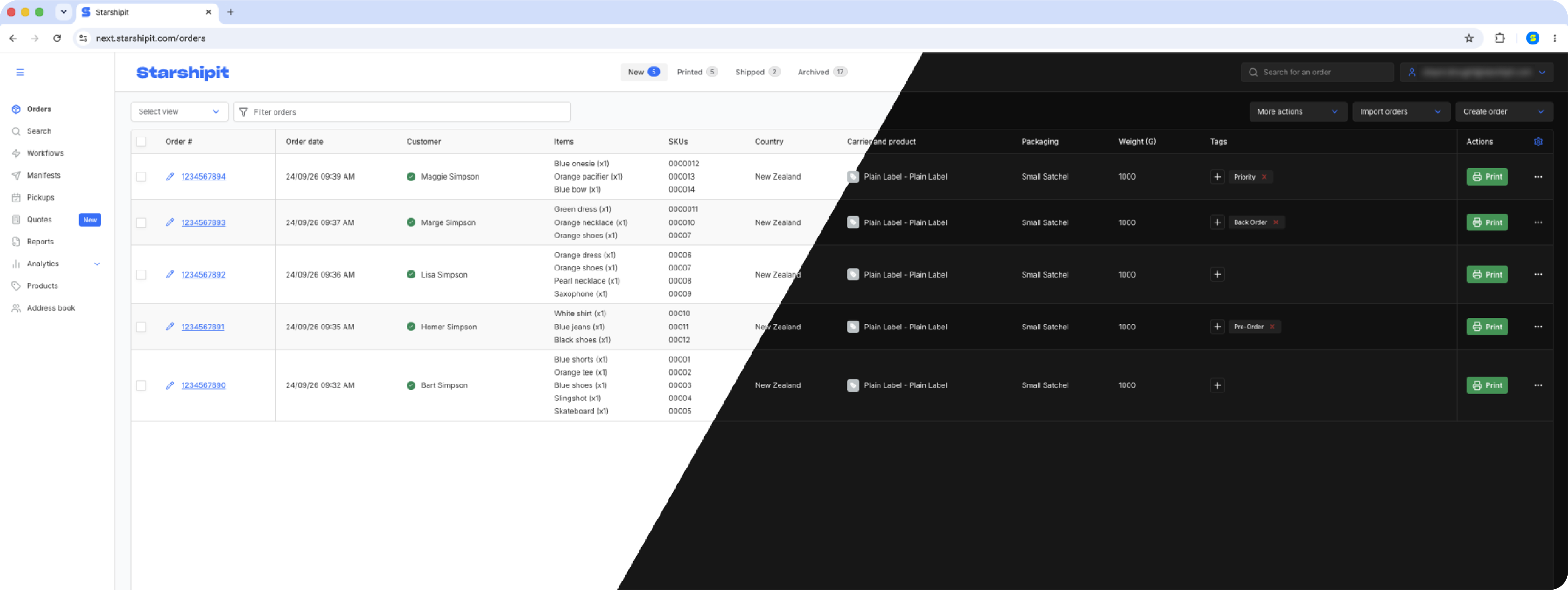
You can now tailor what you see and how you work:
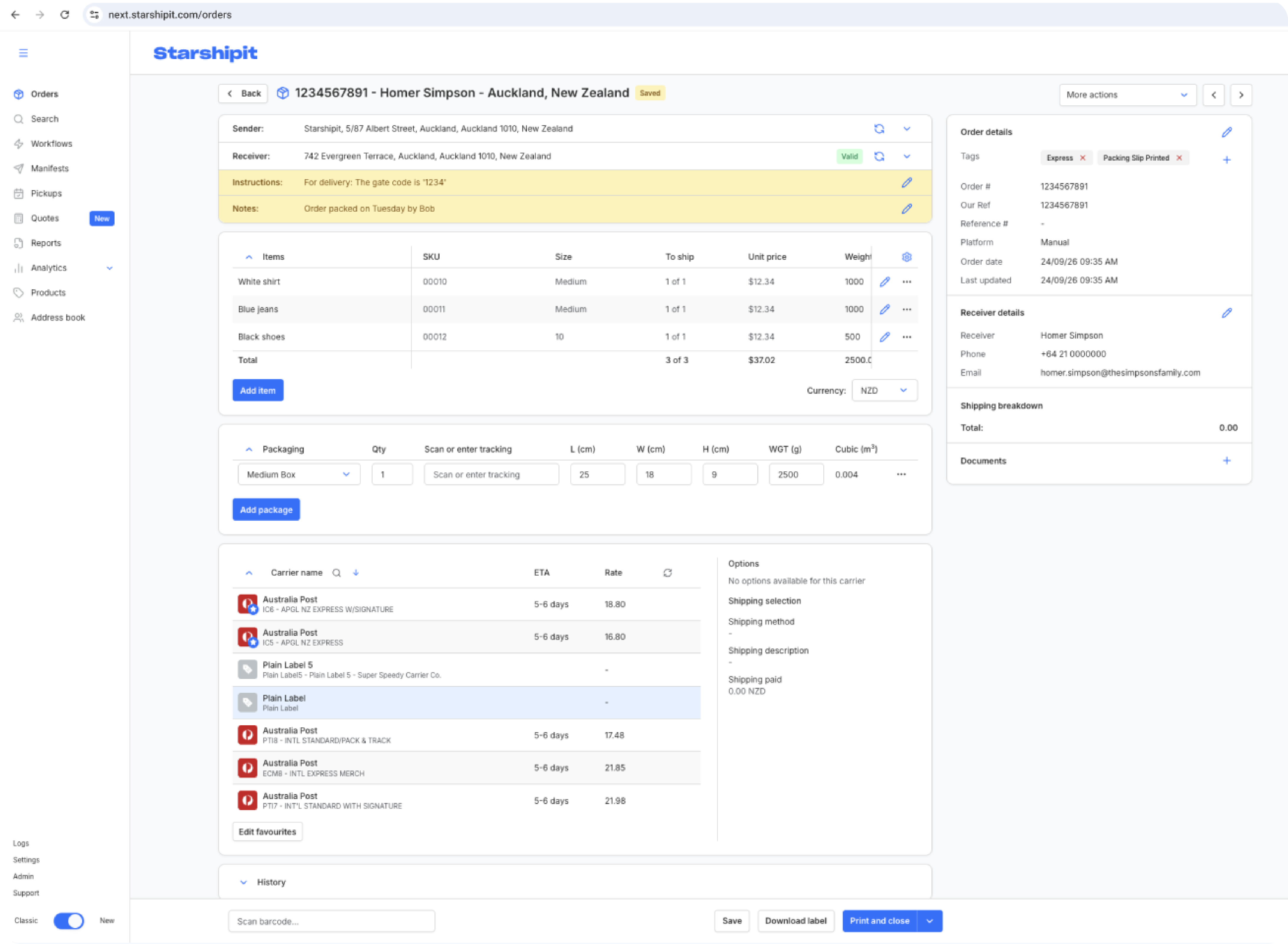
We’ve made everyday order work easier to move through, with the details you need closer to hand.
Carriers and rates now sit higher on the Order details page, so you can check them with less scrolling. You can collapse Items and Packages when you need a clearer view, see the order ID in your browser tab when you’re working across multiple orders, and correct an invalid address directly from the order.
Looking for a courier, integration or report type? You can search the list instead of scrolling through it.
Less hunting around, fewer clicks and more time getting orders out the door.
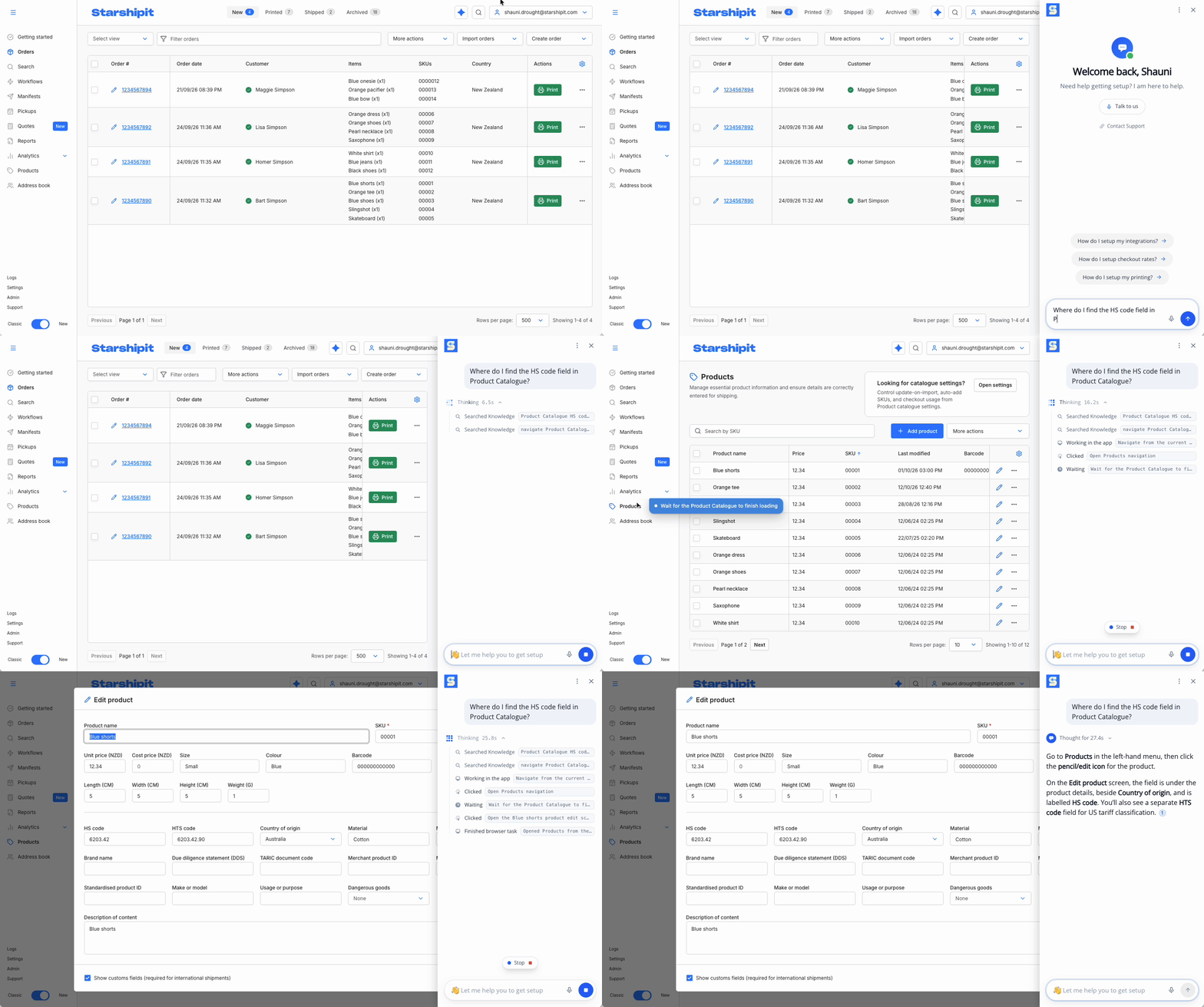
If you’ve used Barry before, you’ll know he can answer questions about how Starshipit works. If you haven’t, think of him as a handy product expert to ask while you’re getting things done.
Barry’s had an upgrade. He can now point you to the right place in Starshipit and use tools to help get things set up.
So if you’re setting up checkout rates or trying to find a field in Product Catalogue, tell Barry what you’re looking for. He can help you find your way and get on with the task.
To try him out, log in to Starshipit and click the blue Ask Barry button beside the search bar at the top right. Then type your question.
One of the features we’ve brought across from Classic is a better way to check shipping rates before an order exists.
Some customers regularly quote shipping over the phone, by email or for bespoke orders. Previously, if you were using UI 2.0, you had to create and save an order just to check the available rates.
You can find it in the main navigation under Quotes. Enter your destination and package details and compare available carrier rates without creating an order.
You can use saved packages, quote multiple packages, see recent quotes and create an order directly from the quote if it turns into a sale.
It’s a much cleaner way to answer one simple question: “What will this cost to ship?”
For step-by-step help, see the Quotes guide.
There are a few more updates to make everyday work easier.
You can create sample orders to test your order and printing workflows without using live orders. Reorder rules by dragging them or using keyboard controls, and search packing slip and packing summary variables instead of scrolling through long lists. Pages also work better across different screen sizes.
Some controls have moved. Manage column order from the column options menu in the Orders Grid, and choose Compact or Expanded layouts in Settings > Interface. If you moved from UI 2.0, your selected columns didn’t carry over, so you may need to set them up again.
Starshipit WMS has been busy.
While WMS customers get the full monthly rundown, we’ve pulled out three things that have been growing quickly:
Want WMS Product Updates in your inbox? Sign up here.
We know integrations are a big part of choosing the right WMS. We’ve added 10 new eCommerce, inventory and ERP integrations to Starshipit WMS over the last quarter, helping you keep orders, products and inventory accurate and in sync across your connected channels.
That includes Shopify, BigCommerce, WooCommerce, Adobe Commerce, Cin7 Core, Cin7 Omni, Unleashed, MYOB Acumatica, NetSuite and eBay. And we’re keeping the list growing, with more integrations on the way.
See how WMS integrations work and find the setup guide for your system.
Warehouse teams make hundreds of small decisions every day.
Which orders should be held? Which jobs are ready to move? What should be batched together?
Starshipit WMS automation lets you turn more of those decisions into rules, with recent updates covering order holds, tag-based workflows and automatic batching.
That means less manual checking and fewer repetitive decisions, freeing your team to focus on the work that actually needs their attention.
When things get busy, knowing where the problem is matters just as much as knowing there is one.
WMS now gives you 16 warehouse and shipping reports across fulfilment, stock health, replenishment, space, shipping costs and staff performance.
Recent additions including Backlog & WIP Aging, Slotting & Utilisation and Shipping Economics give you even more ways to spot bottlenecks, understand your space and keep an eye on costs.
Curious what WMS could do for your operation? Log in to Starshipit and head to the Warehouse tab to activate your trial.
Prefer to see it in action first? Watch the WMS webinar.
Security has always been a priority for us, even when the work happens behind the scenes. We’ve now completed our SOC 2 Type 1 audit, an independent assessment of the controls we have in place to protect customer data and manage security.
That gives you independent assurance about the security practices behind the platform you rely on every day.
Next stop: SOC 2 Type 2.
Would you believe this update only covers the highlights? There’s plenty more happening across Starshipit, from smaller workflow improvements and carrier updates to new integrations, ongoing WMS development and more behind-the-scenes work.
From a faster, cleaner Starshipit experience and easier quoting to a growing list of WMS integrations and enhancements, smarter warehouse workflows, new carrier integrations and another step forward in security, there’s a lot moving across the platform.
Oh, and before we forget, the Starshipit changelog has moved to a new home: support.starshipit.com/changelog
See you back here next quarter.
Tara Hunt
More from this author